Upgrade Virtual Machine#
As your workload grows, you can move your virtual machine (VM) to a higher plan with more CPU, RAM, and disk directly from the Dashboard.
How can I upgrade to a higher VM plan?#
To upgrade your VM to a higher plan, follow the steps below:
- Open your instance in the Dashboard section.
- Go to the Upgrade section.
- Select the new instance configuration and click Confirm.
- Confirm the instance upgrade and click Upgrade.
- The virtual machine’s resources will be increased.
Please note: The instance will be STOPPED during the upgrade. Plan the upgrade for a maintenance window if the VM runs production workloads.
Billing is hourly (Pay As You Go), so the new plan’s rate applies from the moment of the upgrade. See Billing Methods for details.
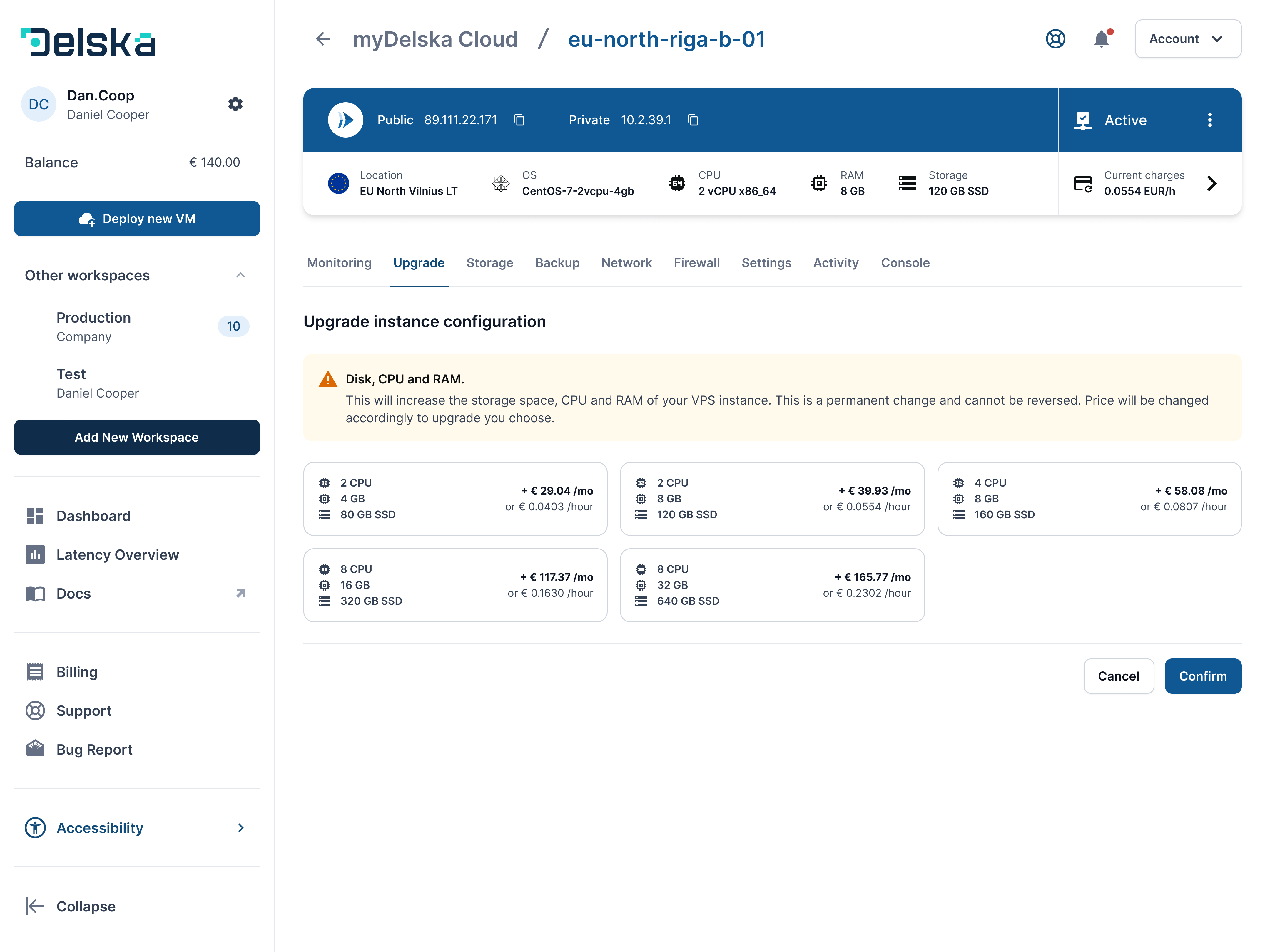
Open your instance in myDelska to upgrade it.
Next steps#
- Add extra disk storage instead of a full plan upgrade if you only need space
- Increase VM internet speed — bandwidth upgrades are also available
- Set monitoring alerts to know when resources run low
Open in myDelska Platform#
Open a VM's Upgrade tab in myDelska directly.